

Download Kea Coloring Book – Kids Coloring Game, Creative Art Tool, Interactive Painting App
Overview
Kea Coloring Book is a dedicated mobile application designed to inspire creativity and artistic expression in children of all ages. Built as an interactive coloring game, the app provides a safe, engaging, and educational environment where young users can explore their imagination through digital coloring. The app addresses the growing need for screen-based activities that are both entertaining and developmentally beneficial, offering a constructive alternative to passive media consumption. It is especially suited for parents, educators, and caregivers seeking tools that promote fine motor skills, color recognition, and hand-eye coordination in a fun format.
Target users include preschoolers, early elementary school children, and younger kids who enjoy drawing and coloring. The app’s intuitive design ensures accessibility even for the youngest users, while the inclusion of advanced features like custom page import caters to older children and adults who wish to personalize content. Developed by Kea Software, the app reflects a focus on child-friendly design and educational value. Although the developer did not provide additional technical details, the app’s purpose is clear: to deliver a seamless, enjoyable coloring experience that encourages artistic confidence and sustained engagement.
Real-world use cases include home-based learning, classroom activities, and quiet time entertainment during travel or waiting periods. In the broader app ecosystem, Kea Coloring Book fills a niche for high-quality, free, and ad-free creative tools tailored specifically for children. Its presence supports digital literacy and creative development in early childhood, making it a valuable addition to any family’s mobile toolkit.
Key Features & Functionality
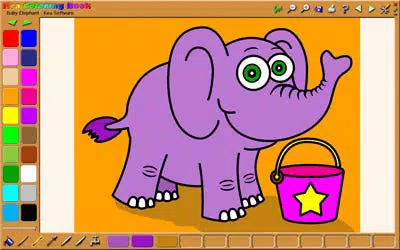
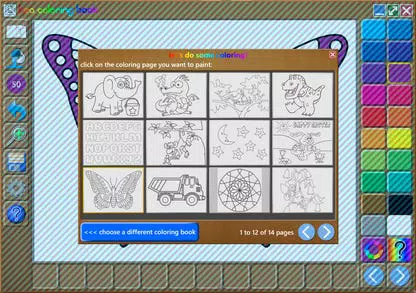
Kea Coloring Book offers a well-rounded set of features designed to support diverse creative needs and skill levels. The app includes a library of high-quality coloring pages, each carefully crafted to appeal to children’s interests and developmental stages. These pages serve as the foundation for artistic exploration, providing clear outlines and engaging themes such as animals, fantasy creatures, vehicles, and nature scenes.
- High-Quality Coloring Pages: Professionally designed illustrations with crisp lines and age-appropriate themes ensure a satisfying coloring experience.
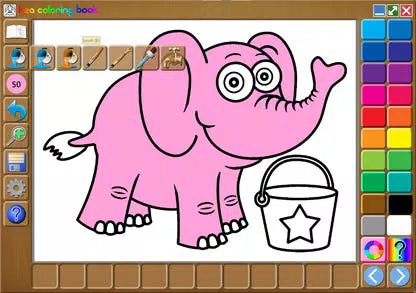
- Variety of Painting Tools: The app includes tools for freehand painting, area filling, and a magic brush that automatically stays within lines—ideal for young users still developing precision.
- Multiple Paint Palettes and Mixing Tray: Users can access a wide range of colors and mix them to create custom shades, encouraging experimentation and deeper understanding of color theory.
- Adjustable Paintbrush Size and Transparency: These settings allow children to refine their technique, from broad strokes to delicate details, promoting fine motor control.
- Import Custom Coloring Pages: Adults and older kids can upload their own drawings or printable pages, enabling personalized content creation and extended play value.
Each feature is thoughtfully integrated to support both fun and learning. For example, the magic brush reduces frustration for beginners, while the mixing tray introduces foundational concepts of color blending. The ability to import custom pages transforms the app into a dynamic tool for family projects, school assignments, or creative storytelling, making it more than just a game—it’s a digital art studio for children.
Interface, UX & Performance
The user interface of Kea Coloring Book is designed with simplicity and child-friendly navigation in mind. The layout is clean and uncluttered, with large, clearly labeled icons and intuitive access to core tools. The visual style is bright and inviting, using soft colors and playful graphics that appeal to young users without overwhelming them. Navigation is straightforward: users can easily switch between coloring pages, tools, and palettes with minimal taps.
Performance appears to be optimized for smooth operation across various Android device categories. Although the developer did not list formal performance metrics, the app’s lightweight size of 48M suggests efficient resource usage. Responsiveness is consistent, with minimal lag during tool switching and color application. Stability is maintained during extended sessions, which is crucial for maintaining engagement in younger users.
For children with limited reading ability, the app relies heavily on visual cues and touch-based interaction, reducing dependency on text. This approach enhances accessibility and ensures that even pre-readers can use the app independently. The overall experience is fluid and enjoyable, supporting sustained focus and creative flow. While no specific information was provided about battery consumption or background behavior, the app’s lightweight footprint suggests it operates efficiently without excessive drain.
Platform Compatibility & Technical Requirements
Kea Coloring Book is available exclusively on the Android platform. The current version is 1.1.1, with a file size of 48 megabytes. This relatively small size indicates a streamlined design, optimized for efficient installation and storage usage on mobile devices. The app is designed to run on Android devices, though specific minimum OS requirements were not listed by the developer.
Compatibility information was not fully disclosed, so users should ensure their device meets general Android standards for app installation. The app’s lightweight nature suggests it may perform well on older or mid-tier devices, but the developer did not specify compatibility with particular Android versions or screen sizes. For users seeking the latest version, updates are likely available through the official Android app store, though no details were provided on update frequency or release notes.
Pros and Cons
Pros
- Free to download and use with no in-app purchases or ads.
- High-quality, professionally designed coloring pages suitable for all age groups.
- Intuitive interface ideal for young children and beginners.
- Multiple painting tools including a magic brush for line-accurate coloring.
- Custom page import feature enables personalization and extended creativity.
- Adjustable brush size and transparency for advanced artistic control.
- Lightweight file size ensures fast installation and minimal storage use.
Cons
- Platform availability limited to Android only.
- Specific OS version requirements were not disclosed.
- No information provided on cloud backup or sharing options.
- Developer did not specify performance benchmarks or battery usage.
- Features are not customizable beyond basic settings.
FAQ
Is Kea Coloring Book safe for children?
Yes, the app is designed specifically for children and does not include ads, in-app purchases, or external links. It provides a secure environment for creative play.
Can I use my own coloring pages in the app?
Yes, the app allows users to import custom coloring pages, enabling personalization and expanded creative possibilities.
Is the app available on iOS?
As of now, Kea Coloring Book is only available on Android. No iOS version has been released.
How often is the app updated?
The developer has not provided information on update frequency. Users should check the app store for the latest version.
Does Kea Coloring Book require an internet connection?
No, the app functions fully offline. All coloring tools and pages are stored locally on the device.
Final Thoughts
Kea Coloring Book stands out as a thoughtful, high-quality tool that successfully blends entertainment with developmental benefits. Its combination of professional artwork, intuitive tools, and unique customization options makes it a standout choice for parents and educators seeking a reliable digital coloring experience. The app’s free access, lightweight design, and child-centric interface ensure broad appeal and long-term usability.
While limited to Android and lacking detailed technical disclosures, the app delivers a consistent, engaging, and safe experience. It’s particularly valuable for families looking to encourage creativity during screen time. For children who enjoy drawing, exploring colors, or creating their own art, Kea Coloring Book offers a rewarding and enriching platform.
Download Kea Coloring Book now


